
My account provides you with a quick overview of all pages.You can access it by clicking on “My Account” at the bottom of the left sidebar.
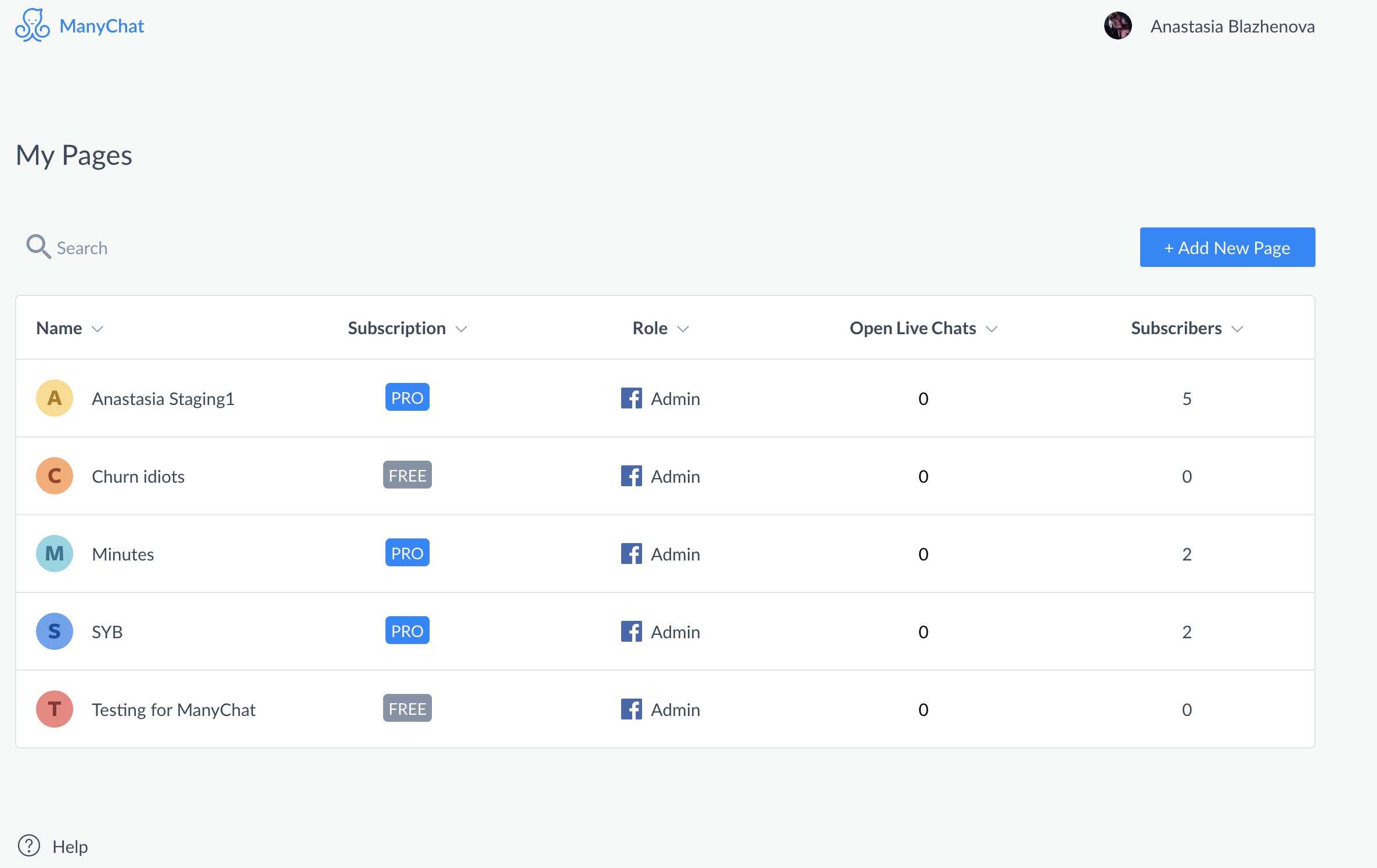
This section contains the following information about each page:
- Name
- Subscription aka professional status (Professional, Free, or Expired)
- Your role on this page
- Open live chat
- subscriber
Functionality:
Search and sort:You can search for pages by name and sort each column by its column header.
Add new page:To connect a new page, simply press the “+ Add New Page” button.
Unsubscribe:To unsubscribe or change a verified email, click on the name in the upper right corner.
Go to page: If you want to go to any page, just click anywhere on that row.
Meaning of each column:
- If the connection to any of your pages is lost, that page will appear at the top of the list.To reconnect the page, click the “Reconnect” button.
- Subscription:Display the subscription status of the bot: Free for Free, Professional for Professional, Exp for “Expired” (shown for 30 days after payment failure, then changes to “Free”).
- Role:Displays your ManyChat and Fb roles on the page.HereLearn more about roles
- Open live chat:Shows how many LiveChat threads are open on each page.
- Subscribers:Displays the actual number of people subscribed to your bot.


